Today I'd like to share with you three very simple yet amazingly useful ways of using Google search engine as your writing assistant. I use at least one of these techniques practically every day, and I believe learning these simply tricks is definitely worth your time.
Spell-check words using Google search: suggestions
This is probably the easiest and most obvious way to use Google search. Just go to Google, type any word in the search box, and if there are no spelling errors, you'll see just the results you were probably looking for.
But if your word is spelled incorrectly, Google will suggest you a correct way of spelling (and the suggestion is a clickable word, so by clicking it you will get the results you had in mind when starting your search):
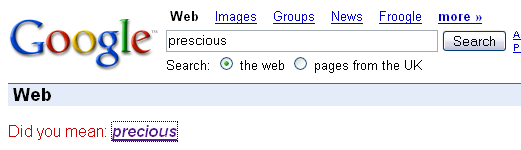
This works best with single words, and Google is mostly right about its suggestions. Still, because this suggestion is based on the number of search results found in Google's database, on rare occasions you could see Google suggest a wrong spelling for complex words, or simply not noticing a wrong spelling in your word and there not suggesting anything better.
Spell-check words using Google search: number of results
If previous tip didn't help you, then this one is definitely for you: pay attention to the number of search results returned with your query. This is another very useful way to check if you have typed your query correctly.
For instance, if you do search for the "prescious", you will see that Google finds only 145,000 results for it. While for "precious" it will return you 142,000,000 results. Another quite common error is to use "unfortunatelly" (456,000 results) instead of "unfortunately" (327,000,000), so you probably get the idea.
Simply comparing the number of results will make the proper spelling obvious almost every time.
Be warned though, that this way of spell-checking relies purely on the number of spellings of a certain word found on the web. So, if millions of people have written some word incorrectly, these search results numbers could be misleading.
Find word definitions with Google
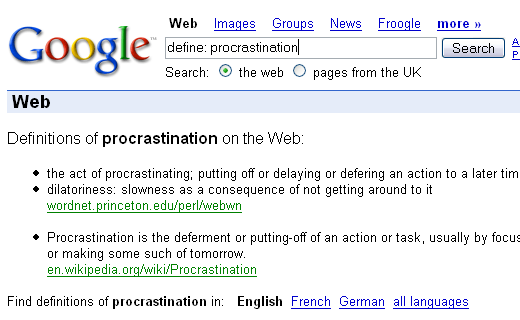
Another very useful feature of Google search is that it's very easy to find word definitions. Simply prefix your search query by the "define: " keyword, and you'll get something like this: