Happy For No Reason course review

February 23, 2009 by Gleb Reys · 6 Comments 

If you're new here, you may want to subscribe to my RSS feed. You can follow me on Twitter, too! Thanks for visiting!

Happy For No Reason

Happy For No Reason

I’d like to offer you an review of a course I’ve recently gone through - the Happy For No Reason course by Marci Shimoff. As you know, being happy and motivated are some of the strongest features of my nature, and so it gives me a pleasure to suggest something you might really use to be happier.

What Happy For No Reason is about

The name of the course kind of gives the idea away - you can and should be happy, and there shouldn’t be a certain reason for that.

For some people this is more obvious than for others, but happiness is one of the basic things you have been given in this life. You don’t have to earn it (however it’s a popular belief that you do), it doesn’t need much effort to be truly happy (again, many people just refuse to accept how simple being happy really is), and making someone else happy doesn’t mean you’re giving your own happiness away - instead, you gain back just by seeing how your smile and attention can make somebody’s day.

Marci had done a great job of analyzing the most common reasons people feel unhappy, and results of her research are presented in a simple to follow guide. All the material is presented on audio CDs, but you need to work with the guidebook to record your thoughts and track your progress as you get used to being a happier person.

Seven Steps to Being Happier

Without giving too much away, I’d like to touch briefly on how Marci can help you.

All the material is organized into seven major steps to your happiness. These steps combine a few lessons each, helping you to take care of your mind, heart, body and soul and achieve a true transformation. There are happiness habits offered along the way, 3 for each of the seven steps. To help you gain an even better understanding of the material, Marci has taken interviews with her friends and colleagues on topics relevant to each of the seven steps. Some of the names you can easily recognize, while others may not mean much to you if it’s going to be one of your first courses - but either way the interviews are great because each one of them is an inspiration on its own.

If you had been reading books on personal development and had taken steps towards improving yourself and changing your views on life, you will probably recognize a quite familiar pattern of a complex, organized approach to becoming a happier person. Like all the other aspects of your well-being, happiness requires changes in everything you think and do, even though some of the changes may not follow the desired direction right away.

What to expect from the course

Marci’s work had been the best course I’ve taken so far (and the first one from Learning Strategies I’ve looked into), and I’m pleased to be able to recommend it.

I’m quite a happy person myself, so going through the course didn’t help me change overnight (especially since its’ advised that you take plenty of time, about a week for each step) into the happiest person on the planet. Still, it was great to learn a few new habits and to simply take the time to think more about being happy and making it possible for my family to feel happier too.

Even though the course focuses on all the improvements and positive changes, it invariably helps you address the negativity which prevents you from enjoying life as it is.  It is very important to firstly recognize the things which make you unhappy, and then to reassure yourself that hardly any of these things can prevent you from being happy in the long run. If you choose to be happy and agree with yourself to maintain your happiness, it will quickly stop being a task and turn into one of your most natural states.

So here’s what to expect from the Happy For No Reason course:

  • if you’re unhappy or even plan miserable, you’ll feel better and learn the ways to gradually rediscover the joy and happiness once again.
  • if you’re doing okay but lack the happiness spark in your life, you’ll certainly get an idea or two to go from feeling not-too-bad to a really-good kind of experience
  • finally, if you’re mostly happy already - you’ll draw new inspiration from the interviews and get ideas on how to make happier someone who means a lot to you

I had spent a few weeks working on this course and definitely enjoyed it, especially the interviews. I’m not sure if it’s going to change your life and I can’t promise it will make you a happy person, but if you’re ready to take a few steps in this direction - who knows how far you will get? Good luck!
Online tool review: GTDagenda

May 9, 2008 by Gleb Reys · 5 Comments 

I’ve recently been approached by Dan from GTDagenda.com, and spent some time looking at his online service.

I’d like to share my findings with you in case you’re looking for the next online tasks and projects management tool which follows some of the best ideas of David Allen’s Getting Things Done (GTD) approach.

What is GTDagenda?

GTDagenda is a new online tool for managing your tasks. It can be used as a simple to-do list tool, or can easily be incorporated into projects-based workflow. To help you stay on track, it supports setting goals and helps you manage your calendar.

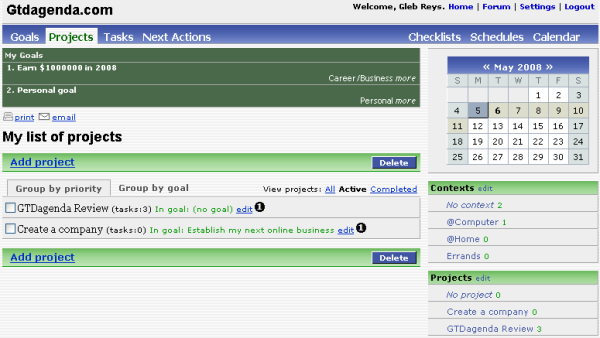
GTDagenda - Projects view

Naturally, there are some great features inherited from the world of GTD: contexts, projects and next actions are all here for your convenience.

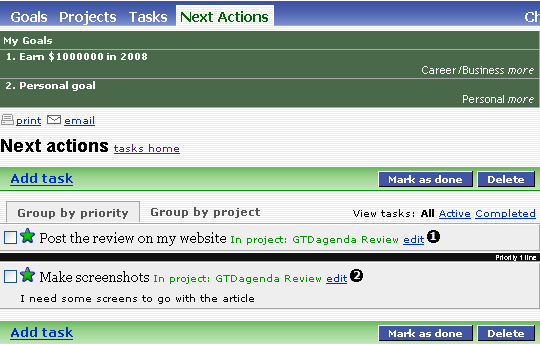
Frankly, contexts and projects aren’t anything special these days - pretty much every second online tasks management tool has them, but Next Actions, surprisingly, is still very hard to come by. In GTDagenda, Next Actions are put right in the main menu of the website, allowing for instant access to all the next actions in your projects. I believe Next Actions is the default view of GTDagenda once you log in:

GTDagenda Next Actions

At the moment, you can have as many Next Actions for the same project as you like, but I’ve found that you can nicely prioritize them if you use the priority field (can be seen in the screenshot - priorities are the numbers in black-coloured bubbles).

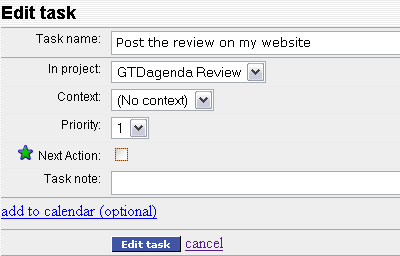
Adding tasks is done in a very standard way, but all the basic are covered: parent project, due date, priority and even a text note for each task, as well as a Next Action flag:

I expect that the bulk tasks creation feature will be implemented very soon, cause adding a few tasks in a go for a particular project would be really great.

Unique features of GTDagenda

Checklists

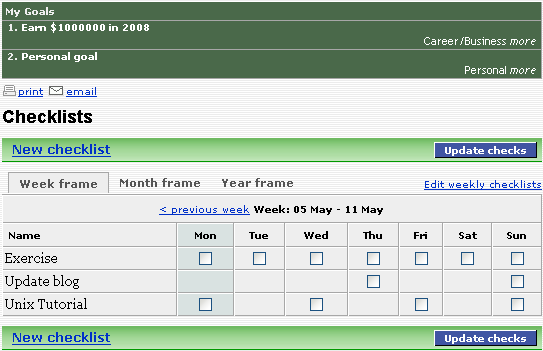
I really liked this feature, it’s not another representation of your daily tasks, but rather a different way to look at your regular activies. For example, I found it very convenient for tracking my weekly gym attendance or for making sure I work regularly on my future posts for my blogs.

It’s a very simple interface which allows you to create and update as many checklists as you like:

GTDagenda Checklists

Schedules

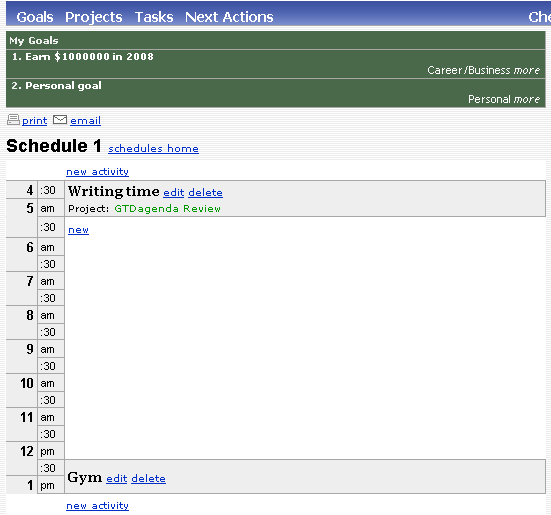
Schedules allow you to plan your days better. You can create as many daily or weekly schedules as you like, and they should help you manage your time through the day better:

GTDagenda Schedule

For example, you can schedule your writing time, your lunch break or your gym session, just to get an idea of how your day will look. You can similarly block time for any other activities without going into too much detail. But, based on your schedule, you can then expect to spend appropriate amount of time working on specific tasks.

I may want to concentrate on a specific topic for my writing today, and will have a task called “Write more on GTD workflow” in my tasks list, however in my daily schedule I’ll simply know that it’s time to get busy writing based on my “Writing time” slot.

Neither Checklists not Schedules are mapped into projects or tasks, however you can specify which project a particular schedule should be attributed to. Like I said, these features simply allow you to experiment and optimize your time - based on your expectations and not on the actual tasks lists.

User friendly features of GTDagenda

The service itself is very young and is still very much in development - new features are added weekly, and you can keep track of them using this page: GTDagenda - What’s New.

There are some really nice features which make this service universally pleasant - print and email options, for example. Printing allows you to print your projects, tasks or next action lists as a nice-looking list. I thing Next Actions are a great list to print - will help you stay on track even if you’re away from your browser, for example.

Conclusion

GTDagenda is a promising project. It is being actively developed and has good chances of becoming a really useful tool for your daily use. There are different plans - one free and two paid ones, so all options are covered. If the pace of development stays the same for the next few months, I see a really bright future for GTDagenda.

I don’t think it’s good enough for me to jump off my Vitalist account, but it’s going to be good enough for many who are just looking around. I’ll definitely revisit the tool once it gets HTTPS access for access security and AJAX for better interface experience, but the set of core features is a great mix and so it has a lot of potential.

FruitfulTime Task Manager Review

February 8, 2008 by Gleb Reys · 4 Comments 

FruitfulTime Task Manager

Today I’d like to review a new player on the task management software market - the FruitfulTime Task Manager.

What is FruitfulTime Task Manager

As you can guess from the name, this is a task management software. Upcoming versions may expand the functionality of this tool, but for the moment FruitfulTime Task Manager does just what it promises: simple task management for stress-free productivity.

Read more

BlogRush: An Instant Way To Get Relevant Traffic

September 23, 2007 by Gleb Reys · 9 Comments 

BlogRush

BlogRush has finally arrived and is quickly picking up the pace!

If you’ve been waiting for increasing the amount of relevant traffic to your blog, then I suggest you join the BlogRush and start enjoying its benefits.

For those of you who haven’t heard about it, I’ve compiled a very quick how-to on BlogRush.

Read more

MyLife Organized: Progress Review

June 15, 2006 by Gleb Reys · 4 Comments 

Today I’d like to tell you how some minor tweaks helped me greatly improve my experience with the MyLife Organized software and enjoy managing my daily tasks even more.

This week has been quite controversial for me. I’m enjoying the week because I’ve managed to do so many things already, and it’s not even Friday evening yet. But I also felt somewhat frustrated about the things I had plans to do but never found time to make them happen. It wasn’t a major frustration now, but more like a disappointment of some opportunities you missed without any reason for doing so. Having seen the negative impact on my daily performance imposed by this frustration, I’ve decided to stop and analyze the situation.

You see, what happens quite often is that we get so caught up in doing things, that we neglect the processes of thinking about our tasks or reviewing the results accomplished. We’re so busy that we aim for the immediate result, and because somewhere deep inside we have a rough idea of how effective we really are, we trust this feeling and we skip the review process. We postpone such reviews till “it’s appropriate to have a break” or when we “don’t have so many things to do”. And while we’re conscious enough that such good times may not come in the nearest future, we usually find it an acceptable sacrifice to be made. After all, the things are still being done on time, and that’s what really matters! That is not entirely true. And I’d like to explain briefly why I believe reviewing your progress is a vital part of your personal development, and any area where you’re aiming for major improvement, for that matter.

So, looking back a few days, here is the single thought that I found the most frustrating when reviewing my tasks for each day: I’ve been working really hard, yet there are many things from today left to be done tomorrow.

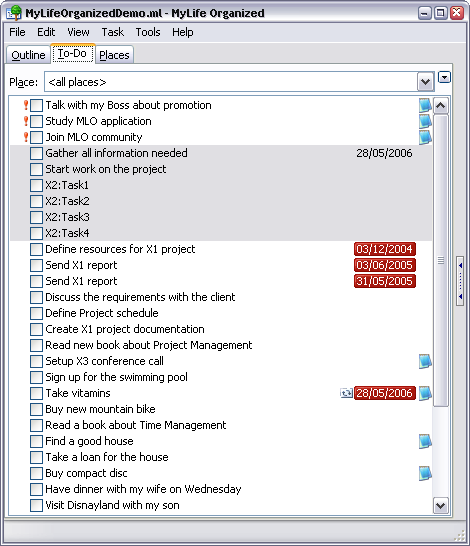
As you remember, I’m trying to organize my plans and tasks in a form that I have an easy overview of things to be done today, this week, this month, and in some distant future. At the end of each time period, I take few minutes to review it. Usually, I do this review at the end of my day, right after I get back home - this is done so that I finish off the open loops for the working day, and review the plans for the rest of the evening.

The frustration I had was seeing a long list of things which were meant to happen today, but never had the time allocated to them. So these tasks effectively become plans for the following day. Having started day with a certain number of tasks to do, it is very frustrating to finish the day with the same or even bigger number of similar tasks.

But in reality, the only reason for the frustration there was the lack of my focus. When reviewing your day, it is absolutely vital to keep track of not only the things you have left to be done, but also the once you’ve completed. When I stopped for a moment to analyze the frustration of mine, I was surprised to notice that all the frustration was caused by my recent switch to the MyLife Organized software for managing my tasks, and the particular way this software presents the lists of tasks and plans.

What happened is that the default behaviour of MyLife Organized didn’t have few important things:

  • completed tasks are not hidden
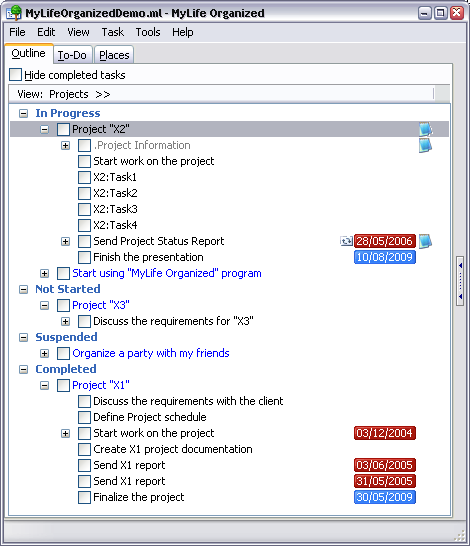
    By default, all the completed tasks are still visible there in the Outline view of the software. This means that your to-do lists only grow in size and therefore increasingly irritate (and quite often, even intimidate) you. Luckily, there is a checkbox right there to hide the completed tasks and this makes the Outline view look a whole lot better :)
  • there is no separate tab for the completed tasks
    I was getting frustrated cause I didn’t really have an easy way to see how much I’ve done during the day. Because of this, I was automatically maintaining my focus on only the things not finished, which isn’t such a bad idea, but is definitely not enough to see where you really are. Again, I’ve found out that Outline tab has a number of different views, and one of them is the list of completed tasks sorted by either the day or the project they belong to.

I must say I’m impressed with the software. I definitely appreciate the flexibility it has. While not all the features are obvious and intuitive, it’s still a great joy to finally discover them and realise that they do exactly what you want.

I guess the most important lesson I’ve learned from this week about personal development, is that it’s always important to maintain your focus on things that matter to you most. Given a particular situation or environment, you may want to pay more attention to the list of current things, but generally it’s always a good idea to review what you’ve done to really appreciate the amount of things you ticked off your list.

Next Page »